Think of keyword match types as a volume dial for Google Ads.
Turn it wide (broad match) and your ads can appear for many related searches. Turn it narrow (exact match) and you mostly show for people searching something very close to your keyword. Negative keywords are the mute button: they stop your ads on searches you do not want.
Google documents the official rules in Google Ads Help on match types. This guide translates those rules into plain decisions you can use in an account this week.
Key takeaways
- Three positive match types: broad (widest), phrase (middle), exact (tightest).
- Negative keywords block waste. They are as important as the keywords you bid on.
- Exact and phrase are looser than they used to be because of close variants.
- Broad match works best with Smart Bidding and a habit of reviewing search terms.
- If you only remember one habit: open the search terms report every week and add negatives.
Video: the three match types with one example
Nine minutes that explain match types with a single running example, which is the way to learn them.
Three things worth taking from it:
- You give Google a keyword; the user gives Google a query. Match type is the rule for how close those two have to be. Framing it that way makes the rest obvious.
- Broad match matches intent, phrase match matches meaning, exact match matches the words. With the keyword "electric guitar", broad can show your ad for "guitar pedal"; exact will not.
- Plan match types before you open the dashboard. His point: the account interface pushes you to build campaigns immediately, and match type is the decision that controls both reach and spend.
The negative keywords section below is the missing fourth type; the video mentions it only in passing.
A simple example to keep in mind
You sell running shoes online.
Someone types a search into Google. Google checks your keywords and decides whether your ad is allowed to enter the auction. Match type answers one question:
How related does that search need to be before my ad can show?
Same product. Very different outcomes depending on match type and negatives.
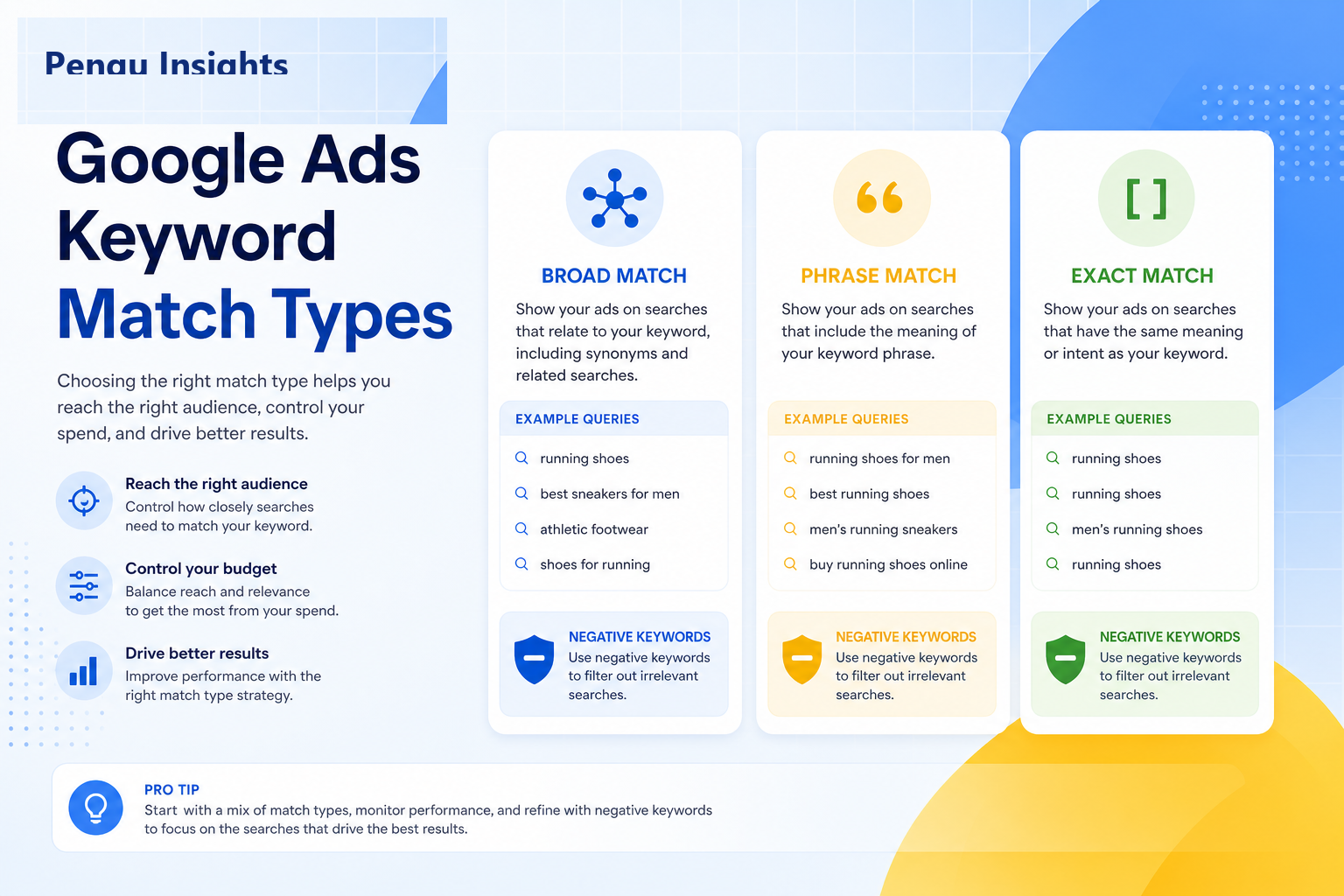
Broad match: widest reach
How you enter it in Google Ads: type the keyword with no quotes and no brackets.
Example keyword: running shoes
What it means in practice: Google can show your ad on searches that are related to running shoes, not only searches that contain those exact words. That can include synonyms and nearby ideas.
Searches that might trigger your ad:
- "buy ladies running sneakers"
- "best shoes for jogging"
- "marathon footwear deals"
When broad match helps: you already track conversions well, you use Smart Bidding (like Target CPA or Target ROAS), and you are willing to clean up junk queries with negatives.
When broad match hurts: a new account, weak conversion tracking, or nobody reviewing search terms. Budget can leak into irrelevant clicks fast.
Google generally recommends pairing broad match with Smart Bidding, not with manual bidding alone. For the deeper strategy, see broad match and Smart Bidding automation.
Phrase match: middle ground
How you enter it: put the keyword in quotes.
Example keyword: "running shoes"
What it means in practice: the search should include the idea of your phrase. Extra words can appear before or after. Google also allows close variants (similar wording with the same meaning).
Likely matches:
- "best running shoes for flat feet"
- "buy running shoes online"
Unlikely match:
- "dress shoes" (different product idea)
Best use: you want more traffic than exact match, but you do not want the full sprawl of broad match yet.
Exact match: tightest control
How you enter it: put the keyword in square brackets.
Example keyword: [running shoes]
What it means in practice: your ad can show when the search has the same meaning or intent as your keyword. That includes close variants, plurals, and some reordering. It is not limited to the exact typed characters anymore.
Likely matches:
- "running shoes"
- "shoes running" (same idea, close variant rules)
Best use: brand terms, proven converters, and times when you need tight cost control while you collect data.
Mental model: exact match is your highest-control setting, not a literal lock on one string of letters.
Negative keywords: the part most people underuse
Positive keywords decide when your ad can show. Negative keywords decide when it must not.
Back to the running shoes shop. Without negatives, you might pay for clicks from people searching:
- "running shoes jobs" (they want a job, not shoes)
- "free running shoes giveaway" (they want free, not to buy)
- "running shoes repair near me" (they want a cobbler, not your store)
A negative keyword is you telling Google: do not show my ad for that kind of search.
Three ways to add negatives (plain English)
1) Negative broad (widest block)
You type: jobs
Rough meaning: block searches that include those words (Google applies its negative broad rules).
Everyday use: stop a whole theme, like jobs, salary, or DIY, across many query shapes.
2) Negative phrase (block a phrase idea)
You type: "free running shoes"
Rough meaning: block searches that include that phrase meaning.
Everyday use: stop a specific unwanted phrase without blocking every word separately.
3) Negative exact (narrowest block)
You type: [running shoes jobs]
Rough meaning: block that specific search idea, not every related query.
Everyday use: you saw one bad query in the search terms report and want to kill only that pattern.
A practical weekly workflow
- Open the search terms report for the campaign.
- Sort by cost or clicks.
- Ask: "Would I pay for this search again?"
- If no, add a negative the same day.
Useful starter lists (edit for your niche):
- Universal junk: free, jobs, salary, torrent, DIY, cheap knockoff terms you cannot serve
- Wrong product line: categories you do not sell
- Wrong geo or service: cities or services you do not cover
Time budget that usually works: about 20 minutes per active Search campaign, once a week.
Which of the keyword match types should you start with?
If the account is new (first few weeks)
Start with exact and phrase on your core terms. Learn which queries convert. Add negatives aggressively. Do not jump straight into broad match.
If you already get steady conversions
Keep winners on exact for control. Use phrase to capture useful modifiers. Introduce broad + Smart Bidding only on ad groups with solid conversion history and clean tracking.
If you need scale and your tracking is trustworthy
Broad match can find new converting queries faster than you can type them. The tradeoff is ongoing negative keyword work. Without that habit, scale becomes waste.
How Smart Bidding changes the story
Smart Bidding (Target CPA, Target ROAS, Maximize Conversions) sets bids per auction based on how likely a click is to convert.
Broad match feeds the algorithm more query variety. That can help if your conversion signal is clean. It cannot fix:
- A broken landing page
- The wrong conversion event being counted
- No value data when you optimize for revenue
Fix tracking and landing pages first. Then choose match types.
For quality and auction context, see Google Ads Ad Rank explained.
Common mistakes (and the fix)
Mistake: Broad match on a brand-new account with no negatives.
Fix: Start exact/phrase, build a negative list from real search terms, then expand.
Mistake: Same keyword as broad, phrase, and exact inside one messy ad group.
Fix: Keep structure clean so you can read performance by intent.
Mistake: "Google optimizes now, so I never check search terms."
Fix: Schedule a weekly search term review. Automation still needs human guardrails.
Mistake: Exact match only, forever.
Fix: Exact is great for control, but you will miss useful query variants. Add phrase or carefully managed broad once data exists.
Mistake: Ad copy that only matches one spelling of the keyword.
Fix: Write headlines that cover the real intents showing up in search terms, including close variants.
Quick decision guide
Ask yourself one question:
Do I need more control, or more discovery?
- Need control → exact (and negatives)
- Need balance → phrase
- Need discovery at scale → broad + Smart Bidding + weekly negatives
- Seeing junk traffic → add negatives before you raise budget
What to do next
Pick one live Search campaign. Open search terms from the last 14 days. Add at least ten high-quality negatives. Then check whether any high-spend ad groups are still on broad match with weak conversion data. Tighten those to phrase or exact until the account earns the right to go wider.
Match types are levers. Negatives are the safety rail. Use both.
To group a keyword list into match-type ad groups in minutes, run it through Keyword Clustering in Pengu Insights. Free plan, no card.
FAQs
What are the keyword match types in Google Ads?
The main match types are broad match, phrase match, and exact match. Negative keywords exclude queries. Each type controls how closely a user's search must relate to your keyword before your ad can show.
Which Google Ads match type should I use?
Use exact and phrase for control and learning phases. Use broad match with Smart Bidding when conversion tracking is strong and you maintain aggressive search term and negative keyword reviews.
What is broad match in Google Ads?
Broad match allows ads to show on searches related to your keyword, including synonyms and related concepts. It casts the widest net and requires Smart Bidding plus negatives for most accounts.
How do negative keywords work?
Negative keywords tell Google when not to show your ad. If you sell running shoes and add jobs as a negative, searches like "running shoe jobs" should stop triggering your ads. Add them at campaign or ad group level, and review search terms weekly.
Did Google change phrase and exact match?
Google has expanded close variant matching over years, so exact and phrase match now include closely related queries. Match types still differ in reach, but control is looser than historical exact match.
Written by

Founder of Pengu Insights. Competitive intelligence practitioner for DTC brands and marketing agencies.